Blu-Ray Disc ကုိ
အတုိေကာက္အေနနဲ႕ BD လုိ႕ ေခၚပါတယ္။ High Definition Video ႏွင့္ Data ေတြ
သုိေလွာင္ဖုိ႕အတြက္
ေနာက္ဆုံးေပၚ နည္းပညာနဲ႕ ထုတ္လုပ္ထားတဲ့ Disc ေလးပါ။ ယေန႕ေခတ္မွာ
တြင္က်ယ္စြာ အသုံးျပဳေနတဲ့
DVD တုိ႕ CD တုိ႕နဲ႕ အလားသ႑ာန္ တူပါတယ္။ အျပာေရာင္ Laser
အလင္းတန္းကုိ
အသုံးျပဳၿပီး ဖတ္ရ၊ ေရးရတဲ့အတြက္ Blue Ray Disc လုိ႕ ေခၚတာပါ။ အနီေရာင္
Laser အလင္းတန္းကုိ
အသုံးျပဳတဲ့ ႐ုိး႐ုိး DVD Format ထက္ကုိ Data ပမာဏမ်ားမ်ား သုိေလွာင္ႏုိင္
ပါတယ္။ ႏွစ္ဖက္စလုံး အသုံးျပဳႏုိင္တဲ့ Two Layer DVD ထက္ကုိ (၆)ဆသာတာကုိေတြ႕ရပါတယ္။
တဖက္တည္းသုံးလုိ႕ရတဲ့
Single Layer DVD ထက္ကုိ ဆယ္ဆခြဲေလာက္ ပုိဆန္႕ပါတယ္။
Blu-Ray ဟာ HD
DVD နဲ႕ အၿပိဳင္ ထြက္ခဲ့တာပါ။ ေနာက္ဆုံးမွာေတာ့ Blu-Ray က အႏုိင္ရတယ္ပဲ ဆုိၾကပါစုိ႕။ ဘာေၾကာင့္လဲဆုိေတာ့
HD DVD ထုတ္တဲ့ Company ေတြဟာ Blu-Ray ကုိ စိတ္၀င္
စားလာၾကလုိ႕ပါပဲ။ Blu-Ray Disc ကုိ
Blu-Ray Disc Association ကေန ထုတ္လုပ္တာပါ။ Blu-Ray ရဲ႕
CD/DVD ေတြ အေပၚ အဓိက အားသာခ်က္ကေတာ့ Data ေတြကုိ က်စ္က်စ္လစ္လစ္နဲ႕ မ်ားမ်ား
သုိေလွာင္ႏုိင္တဲ့
စြမ္းရည္ပါပဲ။
ယေန႕ေခတ္မွာ
Electronic ပစၥည္းေတြ၊ Recording Media ေတြ Video Game နဲ႕ Music ေတြထုတ္လုပ္
တဲ့ Company ေပါင္း ၁၀၀
ေလာက္က Blu-Ray Technology ကုိ အသုံးျပဳလာၾကပါၿပီ။
Blu-Ray က Data ေတြ
ဘယ္လုိဖတ္မလဲ
Blu-Ray Disc က
Data ေတြကုိ 1.1 mm အထူရွိတဲ့ Poly Carbonate Layer ရဲ႕ အေပၚမွာ သိမ္းပါတယ္။
Data သိမ္းတဲ့
Layer က Data ဖတ္မယ့္ မွန္ဘီလူးနဲ႕ နီးကပ္ေနတာေၾကာင့္ အလင္းတန္းေတြျဖာထြက္
သြားတာမ်ဳိးလုိ
Data ဖတ္ရာမွာ ႀကံဳရမယ့္ ျပႆနာေတြကုိ ကာကြယ္ေပးပါတယ္။ ဒါမွမဟုတ္ Disc အေနအထား ပ်က္သြားလုိ႕
ဖတ္မရေတာ့ဘူးဆုိတဲ့ ျပႆနာလည္း ရွိမွာ မဟုတ္ေတာ့ပါဘူး။ Data
ေတြ သိမ္းတဲ့ေနရာဟာ
Disc ရဲ႕ မ်က္ႏွာျပင္နဲ႕ ပုိမုိ နီးကပ္လာတာေၾကာင့္ ျခစ္ရာေတြနဲ႕
လက္ေဖြရာေတြကေန ကာကြယ္ဖုိ႕အတြက္
Disc ရဲ႕ မ်က္ႏွာျပင္မွာ မာေက်ာတဲ့ အလႊာတစ္ခုနဲ႕ Coated
လုပ္ထားပါတယ္။Blu-Ray Disc ရဲ႕
Design ထုတ္ထားပုံကလည္း Disc ထုတ္လုပ္မႈစရိတ္ကုိ ေလ်ာ့က်ေစ
ပါသတဲ့။ ႐ိုး႐ိုး DVD ေတြကေတာ့
Recording Layer ကုိ 0.6 mm စီထူတဲ့ Disc ျပား ႏွစ္ခုနဲ႕ညႇပ္ထားတာ
ပါ။ Discႏွစ္ခု ေပါင္းထားတာရယ္၊
Recording Layer ဟာ Disc တခုခုမွာ အေသတပ္ထားရတာ
ရယ္တုိ႕ေၾကာင့္ အလင္းတန္းလာတဲ့အခါ
ျဖာထြက္မသြားေအာင္ ဂ႐ုတစုိက္ ထုတ္လုပ္ထားရတာပါ။
Blu-Ray ကေတာ့
1.1 mm အထူရွိတဲ့ Disc တစ္ခုတည္းမွာ Recording Layer ကုိမ်က္ႏွာျပင္ နားကပ္ၿပီး
ထားတာ ျဖစ္ပါတယ္။
Disc တစ္ခုတည္း သုံးထားတဲ့အတြက္ သူ႕ကုိ ထုတ္လုပ္တဲ့ စရိတ္ေလ်ာ့က်
သြားတယ္ ဆုိေပမယ့္
သူ႕ရဲ႕အေပၚကေန အလႊာတစ္လႊာ ထပ္အုပ္ေပးရတဲ့ ကုန္က်စရိတ္နဲ႕ ဆုိရင္ေတာ့
သိပ္မထူးျခားပါဘူး။ Blu-Ray Disc တစ္ခ်ပ္ကုိ
၀ယ္မယ္ဆုိလ်င္ေတာ့ ယေန႕ ေစ်းကြက္မွာ ရွိတဲ့
Blu-Ray Disc ေတြရဲ႕ တန္ဖုိးက တစ္ခ်ပ္ကုိ $20 ကေန
$50 ေက်ာ္ထိ ရွိပါတယ္။
Blu-Ray ဘယ္လုိ
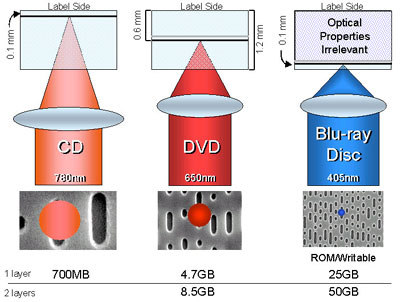
Read/Write လုပ္သလဲဆုိတာ အထက္ပါ ပုံမွာ ျပထားပါတယ္။ ပုံမွာ 1.1 mm ထူတဲ့
Poly Carbonate
Layer Disc တစ္ခုတည္းကုိ သုံးထားတာ ေတြ႕ရပါတယ္။ 405 nm Blue Laser ဆုိတာက လႈိင္းအလ်ား
405nm သာရွိတဲ့ အျပာေရာင္ Laser အလင္းတန္းကုိ ေျပာတာပါ။ DVD မွာ သုံးတဲ့ အနီေရာင္ အလင္းတန္းက 650nm
ရွိပါတယ္။ လႈိင္းအလ်ားပုိေသးငယ္ျခင္းက Disc ဖတ္ရာမွာ
Track Pitch ေတြကုိ ပုိမုိၿပီး ေသးငယ္ေစတယ္။
အဲဒီေတာ့ Data ေတြ ပုိသန္႕ေစတာေပါ့။ Blu-Ray ကုိ အထင္ကရ ျဖစ္ေစတဲ့အခ်က္ေတြထဲမွာ Tack Pitch ေသးငယ္ျခင္းက အဓိကပါ။ Track Pitch ဆုိတာက
Laser အလင္းတန္းက
တစ္ခါဖတ္လုိက္တဲ့အခါ အဲဒီအလင္းတန္းေလးက Disc ျပားေပၚမွာယူတဲ့ေနရာေလး
ပါ။ Blue-Ray Technology မွာ အဲဒီ Tack Pitch ေနရာေလးက 0.3 micrometer ပဲ ရွိပါသတဲ့။
Blu-Ray Disc ကုိ
သုံးမယ္ဆုိရင္
၁။ Blu Ray ဟာ
Data ေတြကုိ ပုိမ်ားမ်ား သိမ္းႏုိင္႐ုံတင္မကဘဲ Interactive ျဖစ္ပါတယ္။ Interactive
ျဖစ္တယ္ဆုိတာက အနီးစပ္ဆုံး
ဘာသာျပန္လ်င္ အသက္ရွင္ လႈပ္ရွားႏုိင္တာကုိ ေျပာတာပါ။
ဒီေနရာမွာေတာ့ အသက္ရွင္တယ္လုိ႕
ေျပာလုိ႕ မရပါဘူး။ ဒီ Blu-Ray ကုိ အသုံးျပဳဖုိ႕အတြက္ Blu-Ray
Format နဲ႕
Subtitle ေတြ Movie ေတြကုိ Internet ေပၚကေန အလြယ္တကူ ယူလုိ႕ရတာကုိ ေျပာခ်င္
တာပါ။
၂။ Blu-Ray က
HDTV ေတြကုိ အရည္အေသြး မက်ေစဘဲ Record လုပ္ႏုိင္ပါတယ္။
၃။ Disc ေပၚမွာ ရွိေနတဲ့
ျခစ္ရာေတြ၊ အစင္းရာေတြကုိလည္း အလြယ္တကူေက်ာ္ၿပီး ဖတ္ႏုိင္တယ္လုိ႕
ဆုိပါတယ္။
၄။ Disc ေပၚက
Program တစ္ခုကုိ ၾကည့္ေနစဥ္မွာပဲ ၎ Disc ေပၚမွာ အျခား Program တစ္ခုက Record လုပ္ႏုိင္ပါတယ္။
၅။ Playlists ေတြကုိလည္း
ကုိယ္တုိင္ ဖန္တီးႏုိင္ပါတယ္။
၆။ Disc ေပၚမွာ
Record လုပ္ၿပီးတဲ့ Program တစ္ခုကုိ ျပန္ျပင္ခ်င္တယ္ျပန္ၿပီးတည္းျဖတ္ခ်င္တယ္
ဆုိရင္လည္း ျပန္ျပင္ၿပီး Record ျပန္လုပ္ထားလုိ႕ရပါတယ္။
၇။ ရွိၿပီးသား
Program တစ္ခုေပၚမွာ ထပ္ၿပီးေတာ့ မကူးမိေစဖုိ႕အတြက္ ေနရာလြတ္ေတြကုိ
အလုိအေလ်ာက္ ရွာေပးႏုိင္တဲ့
စြမ္းရည္လည္း ရွိပါတယ္။
Blu-Ray ရဲ႕ ဖြဲ႕စည္းပုံ
Disc ေတြဟာ Video
ေတြ Audio ေတြ Data ေတြ Pits ေတြေပၚမွာ သိမ္းပါတယ္။ Pits ဆုိတာ ဓာတ္ျပား
ေပၚမွာ
Data ေတြ သိမ္းတဲ့ Megnetic Spot ေလးကုိ ေျပာတာပါ။ ဓာတ္ျပားရဲ႕ အတြင္းကေန အျပင္ဘက္
ကုိ အေၾကာင္းရာအတုိင္း
ခ႐ုပတ္ေခြလုိ ရစ္ၿပီးထြက္သြားတဲ့ ပုံသ႑ာန္ ရွိပါတယ္။ Blu-Ray မွာ Data
ေတြ မ်ားမ်ားသိမ္းႏုိင္တယ္ဆုိေတာ့ ဒီလမ္းေၾကာင္းေလးကလည္း ပုိၿပီး စိပ္ဖုိ႕လုိတာေပါ့။
ဒီလမ္းေၾကာင္းေလး
ေတြ ပုိၿပီးစိပ္ေလေလ သူ႕ကုိတုိးၿပီးဖတ္မယ့္ Laser အလင္းတန္းကလည္း ေသးငယ္ၿပီး
တိက်ဖုိ႕ လုိလာၿပီေလ။
DVD Vs Blu Ray
၁။ DVD က အနီေရာင္
Laser အလင္းတန္းကုိ သုံးပါတယ္။ Blu Ray က အျပာေရာင္ Laser
အလင္းတန္းကုိ
Data ေတြ ေရး/ဖတ္ဖုိ႕အတြက္ သုံးပါတယ္။
၂။ DVD မွာ အသုံးျပဳတဲ့
အနီေရာင္ Laser အလင္းတန္းရဲ႕ လႈိင္းအလ်ားသည္ 650 nanometer ရွိၿပီး
Blu-Ray မွာ သုံးတဲ့
အျပာေရာင္ Laser အလင္းတန္းကေတာ့ လႈိင္းအလ်ား 405 nanometer ရွိပါတယ္။
၃။ အလင္းတန္းရဲ႕ အရြယ္အစားကုိလုိက္ၿပီး
Disc ေပၚကုိ အလင္းနဲ႕ထုိးၿပီး ဖတ္တဲ့အခါ ယူတဲ့ေနရာ
ပမာဏလည္း
ကြာသြားပါတယ္။
အဲဒီေနရာေလးကုိ Track Pitch လုိ႕ ေခၚပါတယ္။ DVD ရဲ႕Track Pitch သည္ 0.74
micrometer ရွိၿပီးူ Blu-Ray ရဲ႕ Track Pitch ကေတာ့ 0.3micrometer သာရွိပါတယ္။
၄။ Data ေတြကုိ
Disc ျပားေပၚ သိမ္းတဲ့အခါ ဓာတ္ျပားဖတ္တဲ့လမ္းေၾကာင္းေပၚမွာ Megnetic အပုံေလး
ေတြ ပုံၿပီးသိမ္းတာကုိ
သိၾကၿပီး ျဖစ္မွာပါ။ အဲဒီ Megnetic Spot ေလးေတြကုိ Pit လုိ႕ ေခၚပါတယ္။
DVD မွာ Pit တစ္ခုရဲ႕
အတုိဆုံးအခ်င္းဟာ 0.4micrometer ရွိပါတယ္။ Blu-Ray မွာေတာ့ 0.15
micrometer သာ
ရွိပါတယ္။
၅။ Tack Pitch ကလည္း
ငယ္တယ္။ Pit ကလည္း ေသးတယ္ဆုိေတာ့ Disc တခ်ပ္တည္းေပၚမွာ Data
အမ်ားႀကီး သုိေလွာင္ႏုိင္တယ္ဆုိတဲ့
Blu-Ray ရဲ႕Technology ကုိ အံ့ၾသစရာေတာ့ မရွိေတာ့ပါဘူး။ DVD
တခ်ပ္ဟာ ပမာဏ 8GB
ေလာက္ သုိေလွာင္ႏုိင္ေနတဲ့အခ်ိန္မွာ Two
Layer Blu-Ray Disc တခ်ပ္က
50GB အထိ သုိေလွာင္ႏုိင္စြမ္း
ရွိေနပါတယ္။
၆။ DVD နဲ႕
Blu-Ray Disc တုိ႕ရဲ႕ ဖြဲ႕စည္းပုံ Format ကလည္း အနည္းငယ္ ကြဲျပားပါတယ္။ Blu-Ray Disc
(BD) Format သုံးမ်ဳိးရွိပါတယ္။ နံပါတ္(၁)က
BD-ROM လုိ႕ ေခၚပါတယ္။
Software ေတြ
Game ေတြ Movies ေတြကုိ တခါတည္း အသင့္သြင္းၿပီး ျပန္ၾကည့္ႏုိင္တဲ့ Recording Type မွာ သုံးဖုိ႕ပါ။
နံပါတ္(၂)က BD-R က
HDTV နဲ႕ PC Data ေတြ သိမ္းဖုိ႕အတြက္ပါ။
နံပါတ္(၃) BD-RE က
ျပန္ဖ်က္၊ ျပန္ေရးႏုိင္တဲ့ အမ်ဳိးအစားပါ။ HDTV နဲ႕ PC Data ေတြ အတြက္ပါ။
HD DVD Vs BD
တဖက္တည္းပဲ အသုံးျပဳလုိ႕ရတဲ့
BD တခ်ပ္ဟာ 25 GB ဆန္႕ပါတယ္။ HD DVD ကေတာ့
15GB ဆန္႕ပါ
တယ္။ BD က 25GB ရတယ္လုိ႕
ဆုိေပမယ့္ တကယ္ေတာ့ သူ႕ဆီမွာက သုံးမ်ဳိးရွိတာပါ။ 23.3GB BD ရယ္၊ 25GB BD ရယ္ 27GB BD ရယ္ ဆုိၿပီးေတာ့ ရွိပါတယ္။ HD DVD မွာ မရႏုိင္တဲ့
အားသာခ်က္ တစ္ခု
ကလည္း BD မွာ ရႏုိင္ပါေသးတယ္။ အဲဒါကေတာ့ Dual-Layer Technology ပဲ ျဖစ္ပါတယ္။
Dual Layer အရဆုိရင္
46.6GB၊ 50GB၊ 54GB အထိ ဆန္႕တဲ့ BD ေတြကုိ ရမွာပါ။ အနာဂတ္မွာေတာ့
100GB ကေန 200GB အထိဆန္႕တဲ့ 4-Layer ကေန 8-Layer အထိရွိတဲ့ BD ေတြကုိသုံးစြဲခြင့္
ရေတာ့မွာ
ျဖစ္ပါတယ္။